

So how did I do that? and what can we do with it?
The URL that the QR Code encodes is http://www.twitter.com/intent/tweet?in_reply_to=128569788623634432
The only bit that you change (so users are replying to one of your tweets, not one of mine!) is the long number at the end (the Twitter Status ID).
The easiest way to find the Status ID is by viewing the individual tweet on twitter.com (In the timeline, click on the time for the particular tweet you want to view) and reading it from the URL.
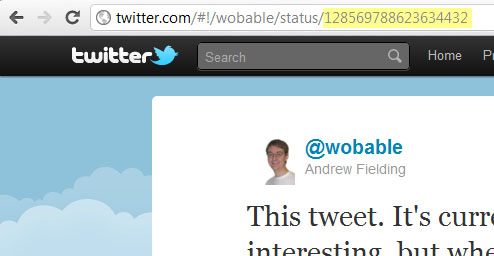
Swap the number in the URL above, and then run it through your favourite QR encoder (my favourite is zxing, but bit.ly will give you a QR Code and analytics – see this post for more details).
I find this quite exciting, as there are all sorts of things we could do with this:
- Run a competition, where the best response to a tweet wins a prize.
- Collect user feedback, on and off line.
Next page: What other intents are available?…
Just discovered you can do something similar on Facebook!
http://www.daddydesign.com/wordpress/how-to-create-a-custom-facebook-share-button-for-your-iframe-tab/